Announcing Jactl 2.8.0

Jactl 2.8.0 is a new release with enhancements, bug fixes, and performance improvements.
It adds a new for-in loop statement with pattern matching and destructuring and has many performance improvements, mostly relating to compilation speed and has been benchmarked at compilation speeds of over 300K lines/s.
For-in Statements
Jactl now offers a for-in loop for iterating over collections. In its simplest form it looks like:
for (i in collection) {
  ...
}
The form is actualy more generic and provides a way of matching a structural pattern to elements of a collection. There are many variants to this form. The following table gives some examples:
| Pattern | Example | Description |
|---|---|---|
| Simple variable | for (i in collection) | Matches all elements and binds each one to i.Type of i is inferred if collection is an array or defaults to def. |
| Typed variable | for (int i in collection) | Matches elements that match on type and ignores others. |
Strict match (:) | for (int i: collection) | Use of : instead of in means there will be an error if an element does not match. |
| List structure | for ([i,j] in collection) | Matches 2-element sub-lists and binds the contents to the binding variables. |
| Typed list structure | for ([int i, String s] in collection) | Matches 2-element sub-lists with elements of given types and binds values to the variables. |
| Type only | for ([int, String s] in collection) | Match on type only without binding for one of the elements. |
Wildcard _ | for ([_, String s] in collection) | Wildcard _ matches any value at that position. |
| Constant value | for ([3, String s] in collection) | Value at given position must match supplied constant value. |
Variable expansion $ | for ([$id, s] in collection) | Value to match against can come from an existing variable using $ to expand its value. |
| Repeated variable | for ([x, x] in collection) | Variables occurring multiple times require match to have same value in each position. |
Wildcard * | for ([a, *] in collection) | Wildcard * matches any number of elements (including none). |
Wildcard * with binding | for ([head, *tail] in collection) | Variable can be bound to * part of a sub-list. |
| Nested list | for ([a, [_, int b, a]] in collection) | Recursively match nested list structure. |
| Map key presence | for ([name:_, age:_] in collection) | Match against maps based on presence of keys. |
Map with extra keys * | for ([name:_, age:_, *] in collection) | Match against maps using * to match against any keys. |
| Map value binding | for ([name:n, age:a, *] in collection) | Match agianst maps binding variables to values in the map. |
| Class type match | for (X : collection) | Match based on user class type. |
| Class type with binding | for (Y y in collection) | Match based on user class type with binding variable. |
| Constructor positional | for (X(3, 4) in collection) | Match on user class type where instance fields match constant values. |
| Constructor with bindings | for (X(a, b) in collection) | Match on user class instances binding instance fields to variables. |
| Constructor named args | for (X(i:3, j:b) in collection) | Match on user class instances with binding variables using named arguments. |
| Nested class pattern | for (ZZZ(X(a,b), Y(5,6,c)) in collection) | Nested constructors with constants and binding variables. |
See section on For Loops in the Language Guide for more details.
Performance Improvements
As well as some runtime improvements, there has been a significant improvement in compilation speed. Jactl 2.8.0 is over 3 times faster than Jactl 2.7.2 at the compilation benchmark which shows Jactl 2.8.0 now compiling at over 300K lines/s (for this particular benchmark):
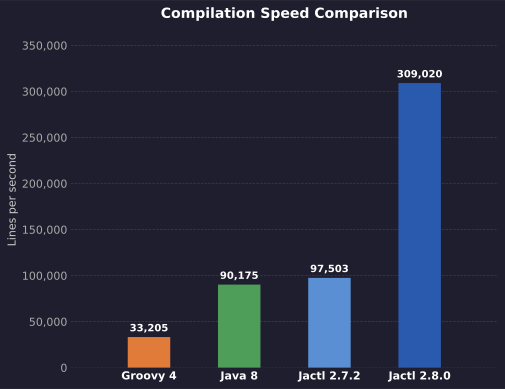
The absolute numbers in the benchmark will depend on the machine on which they are run. It is the relative performance that matters.
Additional Context for Application Integration
It is now possible to configure an application context object on the JactlContext:
MyApplicationContextClass ctx = new MyApplicationContextClass();
JactlContext jactlContext = JactlContext.create().applicationContext(ctx).build();
This can then be accessed when needed in custom functions that have been registered by doing this:
public static Object myFunction() {
RuntimeState state = RuntimeState.getState();
JactlContext jactlContext = state.getContext();
MyApplicationContextClass ctx = (MyApplicationContextClass) jactlContext.getApplicationContext();
...
}
It is also possible to pass a per-invocation context object when invoking JactlScript.eval() or JactlScript.run().
There are multiple eval() and run() variations where this can be passed in.
For example:
Map bindings = new HashMap();
MyInvocationContextClass invocationCtx = new MyInvocationContextClass();
JactlScript script = Jactl.compileScript(...);
Object result = script.eval(bindings, invocationCtx);
To access this context within a custom function:
public static Object myFunction() {
RuntimeState state = RuntimeState.getState();
MyInvocationContextClass invocationCtx = (MyInvocationContextClass) state.getInvocationContext();
...
}
Bug Fixes
#117: nextLine() does not work properly in sync mode
Fixed a bug where if the JactlContext was configured in sync mode (async(false)) and nextLine() was
invoked and needed to block because the configured Reader had no data at the point the script invocation
would through an IllegalStateException.